

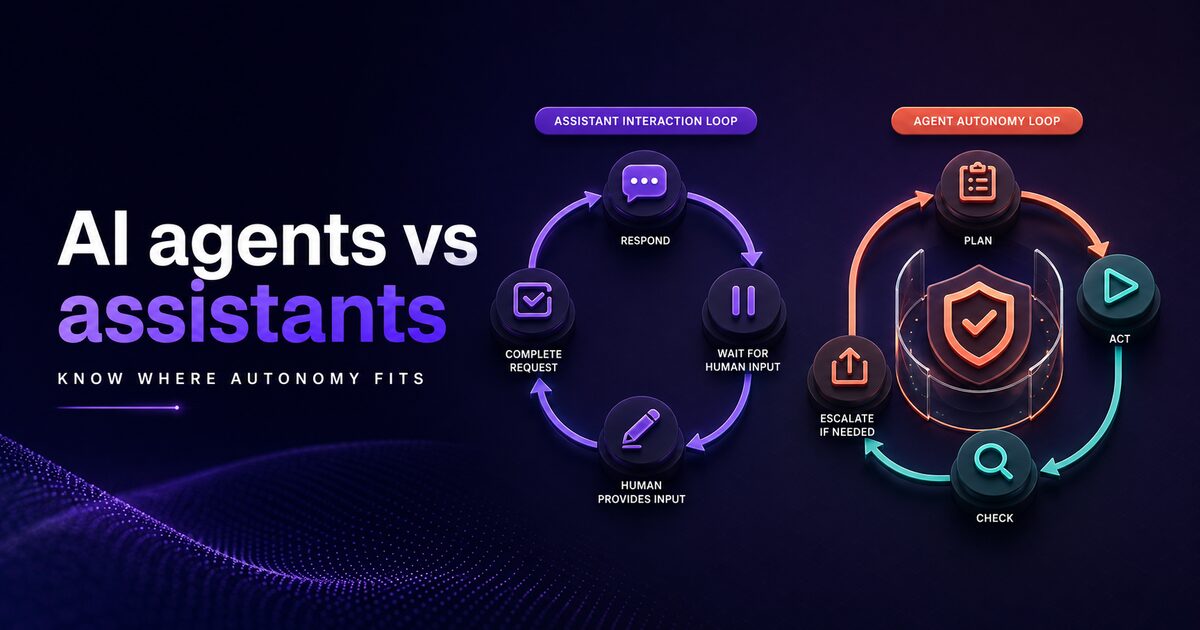
Enterprise teams use the terms "AI agent" and "AI assistant" interchangeably. But the difference is foundational and affects which tool you choose, how you deploy it, what results you should expect, and ultimately whether the automation succeeds or fails. Understanding this distinction is critical before you invest in automation infrastructure.
At its core: agents make autonomous decisions and take action without human intervention. Assistants respond to human requests and provide information or assistance. This distinction matters because it shapes the entire design of your automation. An assistant that's retrofitted to act like an agent often fails spectacularly because it lacks the decision-making infrastructure. An agent deployed where only assistance is needed creates governance nightmares and can cause unintended consequences. Understanding the boundary helps you make choices that actually deliver business value.
Defining terms: agents, assistants, and autonomous systems
Start with fundamental and precise definitions that shed light on structure and implications.
An assistant is fundamentally reactive in design. You give it a request or query. It processes the request, generates a response, and awaits your next instruction. The human directs the interaction flow. Examples: ChatGPT answering questions, customer support bots answering frequently asked questions, search agents that retrieve information in response to user queries, email assistants that summarize messages. The interaction flow is: human request received > AI processes the request > AI generates response > human reads and decides next steps > human provides new request or instruction. The human is always the one steering the conversation and deciding what happens next.
An agent is fundamentally autonomous in design. You give it a goal or trigger condition. The agent reasons about what steps to take to achieve the goal, takes those actions, evaluates the results, and adjusts its approach based on outcomes. The agent directs the interaction and workflow progression. Examples: a sales automation agent that qualifies leads, sends personalized follow-ups automatically, and scores outcomes without human instruction; an operations agent that triages support tickets, assigns them intelligently to appropriate teams, and escalates complex ones; a scheduler agent that coordinates meetings by reading calendars and natural language constraints. The interaction flow is: trigger event or goal > agent reasons about necessary steps > agent executes actions > agent evaluates results > agent decides next steps or escalation > cycle repeats.
These aren't binary categories. There's a spectrum from fully reactive assistance to fully autonomous agency. A sophisticated assistant can handle multi-turn reasoning and accumulate context across conversations. But it still awaits human instruction at each significant decision point. A simple agent might make a single decision and act, but it doesn't reason about the outcome or adjust based on results. But the core distinction remains important: who drives the interaction, the human or the system?
Real systems can blend both capabilities. An agent might gather information by delegating to assistant-like sub-components ("assistant, retrieve these documents for me"). An assistant might trigger agent-like automation in response to specific requests ("perform this task sequence automatically"). But the core distinction of autonomy versus reactivity remains. Understanding this distinction helps you design systems that actually work.
Capability comparison: what agents can do assistants cannot
Agents can do things assistants fundamentally cannot because of this deep design difference in autonomy.
Agents can reason about goals over multiple sequential steps.
An autonomous agent given the goal "qualify leads from the inbound queue and schedule follow-ups" breaks this into multiple steps: retrieve the inbound lead queue meeting certain criteria, extract relevant information from each lead, apply qualification rules to determine fit, score leads by fit quality, send personalized follow-up emails automatically, and track responses to update lead scoring. It performs these steps in sequence without human intervention at each step. An assistant could help with one of these steps in isolation if you ask (extract information from a specific lead), but orchestrating the full workflow across dozens or hundreds of leads requires human decisions at each step: which leads, what information matters, when to follow up, how to personalize, when to escalate. Agents remove this manual sequencing.
Agents can handle contingency and adapt to unexpected conditions.
When unexpected conditions arise during execution, agents adjust their approach dynamically. An operations agent processing support tickets might encounter a ticket that requires human expertise beyond its authority. It escalates appropriately. It might encounter a ticket requiring followup information because the data provided is incomplete. It sends a request and waits. It might recognize a pattern of similar issues and adjust its logic for future tickets. The agent isn't executing a fixed predetermined sequence. It's operating within a decision framework and adapting to outcomes in real time. An assistant doesn't do this naturally. An assistant answers questions when asked. It doesn't decide what questions to ask next or what to do when the answer is unclear or incomplete.
Agents can observe patterns and learn from outcomes.
Some agents accumulate patterns and insights across tasks and improve over time. An agent handling account reconciliation might notice that 15% of discrepancies fall into a specific category that can be auto-resolved without human review. It adjusts its logic to handle this category automatically going forward. An agent handling support tickets might notice that tickets with certain keywords have 85% escalation rates and start routing those to specialized teams automatically. An assistant doesn't retain and refine patterns across conversations because each conversation is mostly independent. Assistants don't learn and improve from patterns in the aggregate.
Agents can operate without direct human requests.
An agent triggers on events: a new lead arrives, a support ticket is created, an account balance drops below a threshold. The agent takes action without someone requesting it. An assistant waits for requests. If your workflow depends on the system reacting to events without human prompts, you need agents.
Agents can make commitments and execute reliably.
An agent tasked with sending follow-up emails every Tuesday at 10am to leads matching criteria can reliably execute this commitment. An assistant can't. An assistant needs someone to ask it to send the emails. For enterprise workflows that depend on scheduled, reliable execution, agents are necessary.
Use case matching: agent vs assistant for your workflow
Not every workflow benefits from agents. Many workflows are better served by smart assistants. Use this framework to decide systematically which approach matches each use case.
Use assistants when:
The workflow involves human decision-making at each step. Customer support Q&A is a perfect example: a human needs to read AI-generated responses before escalating, closing, or routing issues. The human can't trust the AI to make escalation decisions automatically. Research assistance workflows work well with assistants: the human needs to evaluate information before acting. Knowledge lookup where humans query for information and decide what to do: assistants excel. Data entry assistance: humans review extracted data before confirming. In all these cases, assistants provide intelligence and speed without removing human judgment.
The workflow is ad-hoc and unpredictable. Engineering troubleshooting represents this perfectly: each issue is different, the path forward is unclear, you need reasoning support from a system but the human must decide next steps. Brainstorming sessions need creative suggestions but you drive the direction. Analysis where you ask questions, receive analysis, iterate with follow-up questions. These workflows benefit from assistant-like capabilities: responsiveness, context management, multi-turn reasoning, but the human remains the decision-maker.
Skill or stakes are high enough that human oversight is required. Medical case review: a system can gather relevant information and suggest next steps, but a doctor makes the final decision. Financial audit: an assistant gathers data and flags anomalies, but humans sign off. Legal research: an assistant finds relevant cases, but attorneys assess applicability. These domains require human accountability.
Use agents when:
The workflow is routine, well-defined, and repeatable. Lead qualification has clear rules determining if a lead qualifies. The process is identical each time. Ticket triage has rules determining how to route. Inventory reconciliation has conditions determining how to resolve discrepancies. Rules are consistent. These workflows are perfect for agents because consistency beats perfection.
Reliable execution matters more than perfection. Sales follow-ups: an agent consistently reaches out to leads. Some follow-ups might be suboptimal, but consistency matters more. Operations ticket assignment: an agent assigns tickets. Some assignments could be better, but reliable execution 95% of the time beats perfect decisions 50% of the time. These workflows need agents.
Volume is high and human scaling is impractical. Processing 1,000 support tickets daily: a human team handles maybe 100-150 with quality. An agent handles all 1,000, escalating complex ones. At scale (500+ transactions daily), agents become necessary because human scaling is prohibitively expensive.
Timing constraints require automated response. Real-time fraud detection: you can't wait for a human. The agent reviews and acts immediately. Crisis alert routing: events need immediate triage. These workflows demand agents.
Autonomy spectrum: from supervised to fully autonomous
Agents don't have to be fully autonomous. Many enterprises use supervised agents that filter risk while preserving efficiency gains.
Supervised agents reduce risk while gaining benefit. A lead qualification agent suggests follow-up actions and drafts emails. A human reviews, approves, modifies as needed, then the agent sends. The human retains control while agents handle reasoning and drafting. This approach works well when automation mistakes carry moderate risk or cost.
Partially autonomous agents operate with guardrails and escalation. A support ticket agent can auto-resolve tickets up to $50 in potential value. Tickets with higher potential value require human approval. A payroll operations agent can execute payroll runs that pass automated audits. Payroll runs with anomalies flag for human review. These guardrails prevent costly mistakes while capturing most automation benefits.
Fully autonomous agents operate without human review. A lead follow-up agent sends emails, receives responses, scores leads, and updates systems. A customer support agent resolves tickets independently and logs resolutions. This requires high confidence in agent reliability and clear escalation paths when things go wrong. This level only works for low-risk, repeatable, high-volume workflows where occasional errors are acceptable and escalation is well-defined.
The autonomy level you choose depends on domain and stakes. Support automation that might mis-route 2% of tickets might warrant full autonomy if escalation is clear. Financial operations that might make an error usually requires supervised autonomy. Choosing the appropriate autonomy level is as important as choosing to build an agent at all.
| Autonomy Level | Human Involvement | Risk Profile | Efficiency Gain | Use Case |
|---|---|---|---|---|
| Fully supervised | Human approves every action | Minimal | 20-30% | High-stakes, complex decisions |
| Partially autonomous | Agent acts with guardrails, human reviews exceptions | Low-moderate | 60-80% | Mixed stakes, clear decision rules |
| Fully autonomous | Agent acts independently | Moderate-high | 90%+ | Low-risk, repeatable, with clear escalation |
Implementation considerations: complexity and control
Agent implementation is more complex than assistant implementation. Assistants are request-response systems. Agents require orchestration, state management, decision engines, and monitoring.
Complexity comes from several places:
Orchestration. Agents must sequence actions. This requires workflow definition and state tracking. What are the steps? What's the decision tree? What conditions trigger different paths? Assistant implementations don't need this. Agents do.
Context and memory. Agents must maintain context about what they've done and why. They need to remember that they tried one approach and it failed, so now they should try another. This requires structured context management. Assistants typically don't need persistent context managing of this sophistication.
Decision engines. Agents need rules or scoring systems to decide what to do next. Should this lead be followed up with a phone call or email? Should this ticket be escalated or auto-resolved? These decisions require encoding of business logic. Assistants ask humans to make these decisions.
Monitoring and control. Agents acting autonomously require monitoring. You need visibility into what they're doing. You need kill switches if they start behaving badly. You need audit trails for governance. Assistants need less of this because humans observe and control directly.
Control is the counterpoint to complexity. With complexity comes control. An assistant gives you convenience but limited control over outcomes. An agent gives you control: you define the rules, the decision tree, the guardrails. This control is valuable for enterprises.
Xagent addresses implementation complexity. You define workflows in plain language. The platform handles orchestration, state management, monitoring, and audit trails. This brings agent sophistication within reach of teams without deep automation engineering expertise.
Decision framework: choosing the right automation approach
Build a simple matrix to decide agent vs assistant for each workflow methodically.
- Is the workflow routine and repeatable? (Yes: agent candidate, No: assistant)
- Is volume high enough that human scaling is impractical? (Yes: agent candidate, No: either)
- Are timing constraints tight enough that a human can't keep up? (Yes: agent candidate, No: either)
- Are decision rules clear and automatable? (Yes: agent candidate, No: assistant)
- Can you tolerate occasional mistakes if the agent escalates exceptions? (Yes: agent candidate, No: supervised agent or assistant)
Scoring: If four or more questions are "yes," agents are the right approach. If three or fewer, assistants may suffice. If you have two yes answers, you likely want an assistant maybe with some automation features.
Example from a sales team: Lead qualification is routine (yes), volume is 500+ leads weekly (yes), timing isn't critical (no), rules are clear (yes), occasional mistakes are tolerated (yes). Four yes answers: use agents.
Example from customer support: Ticket handling is routine (yes), volume is 1,000 daily (yes), some need real-time response (yes), rules are clear but nuanced (yes), occasional mistakes are not tolerated (no). Four yes answers but score 4: use supervised agents with escalation.
Example from engineering troubleshooting: Workflows aren't routine (no), volume is low (no), timing varies (no), decision rules aren't clear (no), mistakes are intolerable (no). Zero yes answers: use assistants for information gathering, not agents for action.
This framework helps you avoid both mistakes: deploying assistants where you need agents (resulting in manual bottlenecks) and deploying agents where you need assistants (resulting in uncontrolled automation and governance issues).
Building effective agents: a practical approach
Once you've decided that agents are the right approach, the next question is how to build them effectively.
Agent design starts with defining clear goals and success metrics. Don't build agents with vague objectives like "handle customer support." Instead define precisely: "classify support tickets into categories, assign to appropriate teams, auto-resolve tickets that match resolution patterns, escalate anything requiring human expertise." The clearer your goal, the smarter you can build the agent.
Decision rules matter more than sophistication. Agents that perform at 95% accuracy with simple, understandable rules outperform agents that perform at 97% accuracy with opaque neural networks. Simple rules scale, are maintainable, and let you debug when things go wrong. Don't over-engineer your first agent. Start simple. Add sophistication only when necessary.
Escalation logic is often the most important part of agent design. When will the agent hand off to humans? When it encounters conditions outside its authority? When confidence drops below a threshold? When a user explicitly requests human intervention? Well-designed escalation ensures the agent operates within appropriate boundaries and never makes decisions beyond its competence.
Testing and iteration are essential. Build your agent incrementally. Test each component independently. Test the full workflow on a small sample. Gradually increase scope and stakes. Run pilots where the agent handles a subset of live traffic initially. This staged approach prevents catastrophic failures and lets you learn from early deployments.